Sports medical certificate tracker with automatic reminders
An athlete without a valid certificate should not train. SportyGo tells you who has expired, who is about to and who never handed one in, warns families and collects new certificates by itself.
- No credit card
- Ready in 2 minutes
- Data on servers in Italy
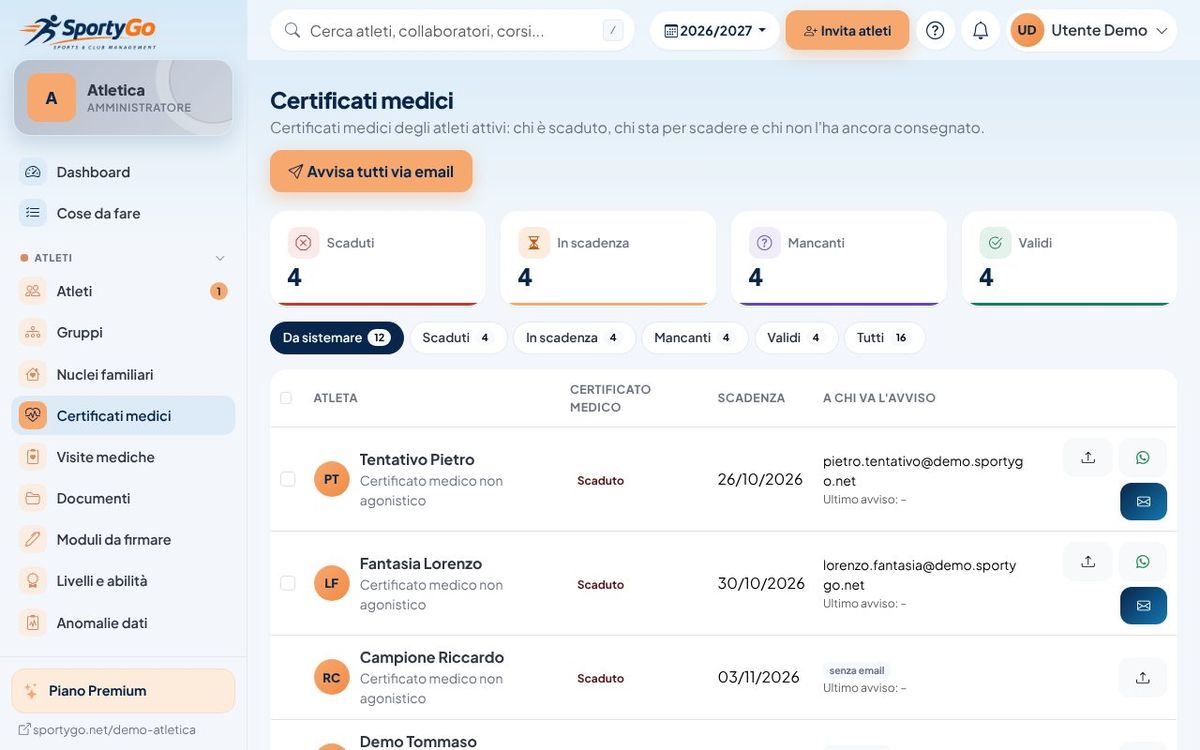
An expired certificate is always found too late
Checking a list of hundreds of athletes by hand is slow and error-prone. Meanwhile parents forget the medical and the office spends evenings sending reminders one by one.
The features you really need
Deadline tracker
Valid, expiring, expired and missing at a glance, with filters by group.
Automatic reminders
Emails to families when the number of days you choose is left, without sending them by hand.
Upload with a link
The parent photographs the certificate and uploads it from the reminder link, even without an account.
Office check
Check the document, confirm the expiry date and the history stays in the athlete's record.
Competitive and non-competitive
A warning when a competitive athlete only has a non-competitive certificate.
Check at the door
With QR check-in the desk sees an expired certificate immediately and, if you want, entry is refused.
How the loop closes
-
Expiry coming up
A few weeks before, as early as you decide, the family gets an email with a link to upload the new certificate.
-
Upload
The parent photographs the certificate and uploads it from the link or the app, entering the new expiry date.
-
Check
The office checks and confirms; if the certificate has expired when the QR is scanned at the entrance, a warning appears.
Simpler for everyone
Office
No lists to check by hand: reminders go out by themselves and certificates arrive already uploaded.
Instructors
They know who can't train before the class starts.
Parents and athletes
They get the reminder in time and upload the certificate from the phone in a minute.
Frequently asked questions
Get your certificates in order
Import your athletes with their expiry dates and turn on reminders: SportyGo takes care of the rest.